This article explains what happens in CBP after a customer successfully completes payment.
Understanding the post-confirmation process helps you:
Reassure customers
Locate bookings quickly in the back office
Understand deposit vs balance behaviour
Prepare items correctly
1. When Is a Booking Considered Confirmed?
A booking is confirmed only after:
Payment is successfully processed, and
The confirmation screen is displayed
If payment fails or the session expires, the booking is not confirmed.
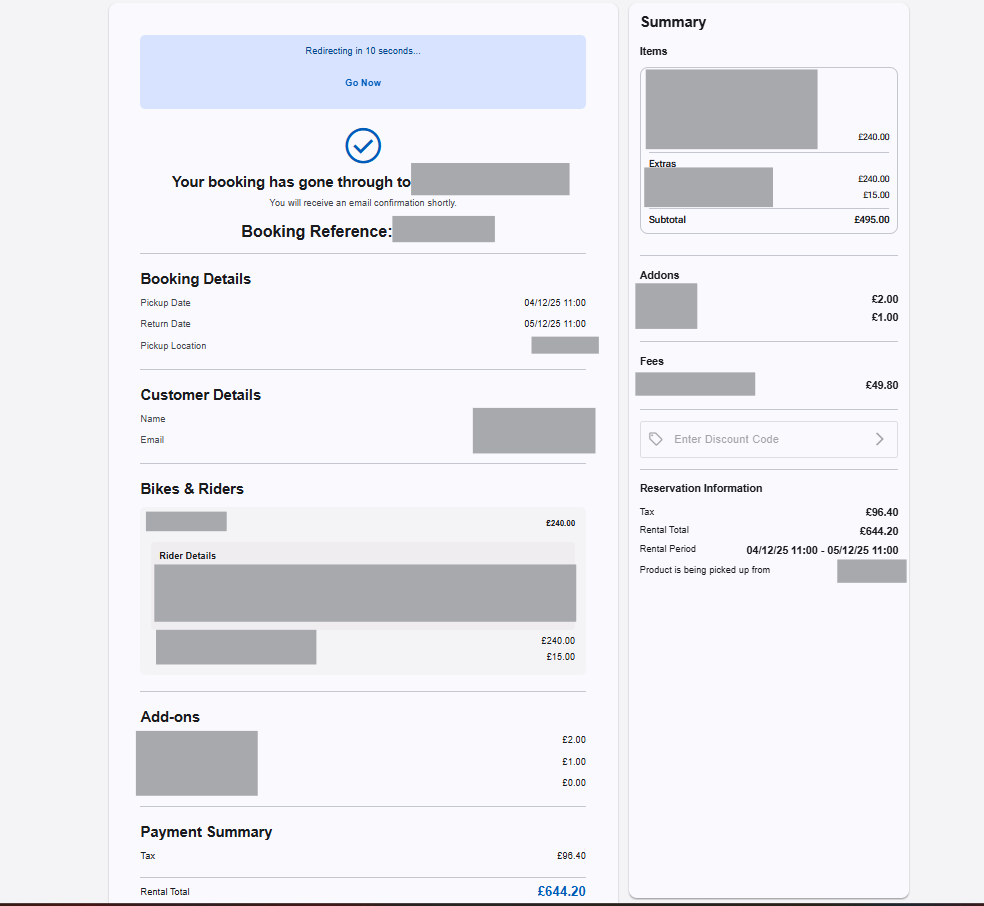
2. What the Customer Sees
After confirmation, the customer sees:
Booking reference number
Rental period (pickup and return dates/times)
Pickup location (if applicable)
Selected products and riders
Add-ons and fees
Rental total
If you use deposits, the confirmation will show the full rental value, not just the amount paid online.
3. Confirmation Email
If confirmation email notifications are enabled:
A confirmation email is automatically sent
It is sent to the email address entered during checkout
If a customer reports not receiving confirmation:
Check the reservation in the back office
Verify the email address used
Ask them to check spam/junk folders
4. How the Booking Appears in the Back Office
Once confirmed:
The reservation appears in your reservation list
The status reflects a confirmed booking
Payment is recorded (either full payment or deposit)
If Auto-Allocate is enabled:
Specific items will already be assigned
If Auto-Allocate is disabled:
The booking will appear as product lines
Staff must assign items manually later
? For more detail, see:
Allocating Items from Product Lines
5. Deposit vs Balance Due
If your store collects a deposit online:
The deposit is recorded as paid
The remaining balance is due later
The back office will reflect:
Total rental value
Amount paid
Outstanding balance
This is why the “Pay Now” amount online may have been lower than the rental total.
For more detail, see:
How Online Booking Pricing Is Calculated (End-to-End) on CBP
6. Inventory Impact
When a booking is confirmed:
Availability is reduced for the selected time period
The product line capacity is reduced
If Auto-Allocate is enabled, a specific item is reserved
7. What Does Not Happen Automatically
After confirmation:
Items are not physically prepared
Waivers are not automatically completed (unless configured)
Staff must still process the rental at pickup
Confirmation does not replace in-store procedures.
Common Questions You May Receive
“Is my booking definitely confirmed?”
If payment was successful and the reservation is in the Confirmed state, yes.
“Why does the confirmation page on CBP show a higher total than what I paid?”
Your store may be collecting a deposit only.
“Why hasn’t the bike been assigned?”
Auto-Allocate may be disabled.
Best Practice for Store Owners
Regularly review confirmed bookings in advance of pickup
Train staff to understand deposit vs balance reporting
Ensure Auto-Allocate settings match your operational workflow
Keep confirmation emails enabled and clearly worded
Was this article helpful?
That’s Great!
Thank you for your feedback
Sorry! We couldn't be helpful
Thank you for your feedback
Feedback sent
We appreciate your effort and will try to fix the article