BRM has a built-in DIN calculator for ski businesses. It works out a binding release setting from a skier's age, ability, height, weight and boot length, and stores the result on their customer record so your team can see it at handover and next season.
Turning the DIN calculator on
You can switch this on yourself — you don't need to contact support.
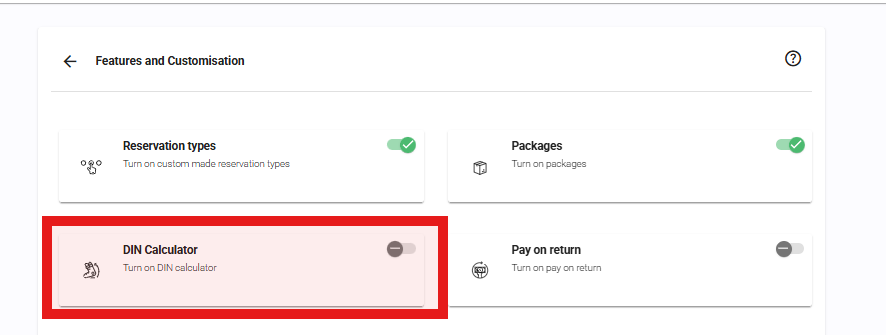
Go to Settings > Admin > Features and Customisation and turn on the DIN Calculator tile.
Turning it on does two things:
- adds the Calculate DIN button and the DIN field to your customer records
- makes the five DIN questions available on your Settings > Customer Data page, so you can choose where they're collected
Calculating a DIN
Open a customer record and press Calculate DIN.
Fill in the five values and we'll work out the setting and save it against the customer.

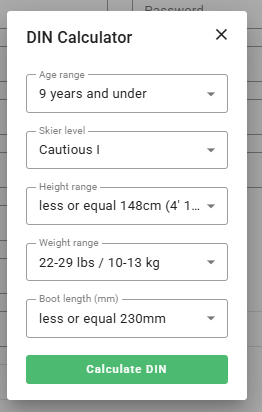
The button only reads Calculate DIN once all five questions are answered. If you leave any of them blank it changes to Save DIN settings — that stores the answers you have given, but it does not work out a DIN. So if the DIN field is still empty after you save, go back in and check that all five dropdowns are filled.
| Question | What to choose |
|---|---|
| Age range | 9 years and under / From 10 to 49 years / Over 50 years |
| Skier level | Cautious I / Moderate II / Aggressive III |
| Height range | Six bands, from 148cm (4' 10") or under up to over 195cm (6' 5") |
| Weight range | Thirteen bands, from 22-29 lbs / 10-13 kg up to 210+ lbs / 95+ kg |
| Boot length (mm) | Eight bands, from 230mm or under up to over 350mm. This is the boot sole length stamped on the boot — not a shoe size. |
Once calculated, the value appears in the DIN field on the customer record, along with the date it was worked out and which of your team ran it. The DIN field itself is read-only — it only ever changes by running the calculator again.
"The selection chosen does not result in a valid DIN value"
Some combinations fall outside the chart — for example a very tall, heavy skier in a very short boot. Rather than guess, we tell you the combination isn't valid. Check the entries, particularly the boot length, and try again.
Collecting the DIN questions from customers
The five questions above are ordinary customer data fields, so you can also collect them from customers — on your Customer Booking Page, on a kiosk, or on a self-registration form. Set that up on Settings > Customer Data.
One important thing to know: collecting the answers is not the same as calculating a DIN. Your customers' answers are saved against their record, but the DIN itself is only ever produced by a member of your team pressing Calculate DIN in the Back Office. That's deliberate — a release setting is a workshop decision, not something a customer self-serves.
Asking per skier rather than per booking
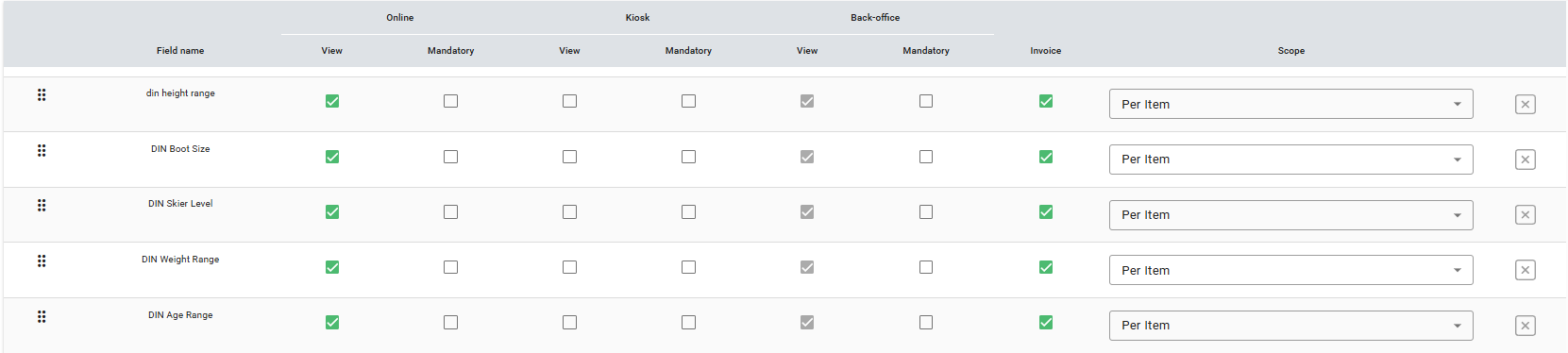
In a family or group booking you'll want these answers for each skier, not once for the whole reservation. To do that, set the DIN questions' Scope to Per Item (or Per Rental and Per Item) on the Customer Data page. Each item then gets its own customer record, with its own DIN.
Only asking skiers, not everyone
If you rent bikes as well as skis, you won't want to ask cyclists for their boot length. You can narrow the questions down per Product Family.
You have to set the Scope to Per Item first. The Customer Data section on a Product Family only lists per-item questions — anything left as Per Rental won't appear there to be unticked.
Full steps are in Customizing Your Customer Data - By Product.
Showing the DIN elsewhere
The DIN doesn't appear on your paperwork automatically. On Settings > Customer Data, find the DIN Setting row and tick Invoice to show it on invoices and rental agreements, or Kiosk to include it on your kiosk and waiver forms.
Why has a customer's DIN changed since last season?
If you recalculate a DIN for a returning customer and get a slightly different number to the one on file, this is usually the expected result rather than a fault.
We updated the calculator in January 2024 so that it correctly applies the age adjustment — skiers aged 9 and under, and skiers over 50, come down one step. Any DIN calculated before that update, for a customer in one of those age groups, will come out one step lower when you run it again today. The new value is the correct one.
If you see a difference that this doesn't explain, please send the customer's five inputs and both DIN values to support@bikerentalmanager.com and we'll take a look.
See Also
Was this article helpful?
That’s Great!
Thank you for your feedback
Sorry! We couldn't be helpful
Thank you for your feedback
Feedback sent
We appreciate your effort and will try to fix the article